


Wolff Mount TVB-62 Mobile presentation furniture for large screens
No se pudo cargar la disponibilidad de retiro
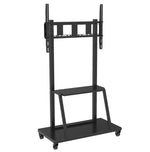
Wolff Mount TVB-62 Mobile presentation furniture for large screens
The Wolff Mount TVB-62 provides a freestanding display setup without a wall installation. It is listed for screens of 55–100 inches and a maximum load of 130 kg.
This Wolff Mount TV stand uses the mounting compatibility stated below rather than a television brand-specific connection. It can suit compatible screens from brands such as Samsung, LG, Sony, Philips, Panasonic, TCL and Hisense, provided the exact device matches its VESA pattern, permitted weight and screen dimensions. “Universal” means suitable across compatible models; it does not mean every TV or monitor fits. Check the specific screen before ordering, including curved or OLED housings and recessed mounting points.
Features of TVB-62
Features and use
A presentation cart designed for large displays. The mobile base allows the screen to be repositioned for meetings, classrooms or exhibition use.
- Functions: Mobile, Lockable
- Material: Steel
- Finish: Black
- Screen size: 55–100 inches
Compatibility and installation
Compare the screen’s mounting-hole pattern and weight with the listed specifications. Screen diagonal alone does not determine compatibility. Check connector clearance, the full movement range and the supporting wall, ceiling, desk or floor surface before installation.
Technical specifications
| Brand | Wolff Mount |
|---|---|
| Model | TVB-62 |
| Screen size | 55–100 inches |
| Maximum load | 130 kg |
| VESA patterns | 200 × 200, 300 × 200, 300 × 300, 300 × 400, 400 × 300, 400 × 400, 400 × 600, 500 × 600, 600 × 400, 600 × 800, 800 × 400 mm |
| Functions | Mobile, Lockable |
| Colour | Black |
| Material | Steel |
| Maximum adjustable height | 175 cm |
| Manufacturer warranty | 10 years |
| EAN | 8720726078498 |
Choose a freestanding viewing position
A Wolff Mount TV stand supports a screen without relying on a wall fixing. Choose a location with sufficient room for the complete base and screen width. For a desktop model, the furniture must provide a stable, adequately sized supporting surface. For a floor stand or cart, plan a clear, level position and compare the available space with the base dimensions. Use the listed model features to check whether wheels, shelves or height adjustment are included.
Check the screen and the complete load
Compare the TV’s VESA pattern and weight without its original foot with the stand specification. Screen size is guidance, not the only compatibility requirement. Consider the screen housing and mounting-point position when checking height and clearance. Any equipment shelf or accessory has its own capacity; the screen load rating must not be treated as a shelf limit. Keep the assembled installation within all applicable limits.
Stability, movement and cable routing
Assemble and secure the stand according to its instructions before attaching the screen. Keep power and signal cables controlled so they cannot snag or create a trip hazard. If the model has wheels, follow its handling instructions and secure it at the destination. Do not assume every stand can be moved with a TV attached. Account for doorways, changes in floor level and the required number of people when planning a mobile installation.
See the product details

Questions before ordering?
Our customer service team is based in the Netherlands and can help in Dutch and English. Have the Wolff Mount model code, your device model and installation measurements ready so we can check the details with you. Features and included components are specific to this product; use the technical information and product instructions when planning the installation.